KeepContext
One memory for every AI app, and tasks any app can pick up when another stops.
A self-hosted MCP server that gives ChatGPT, Claude, Gemini, Cursor, Codex and Copilot one shared memory: ideas, decisions, todos and GitHub activity. Coding tasks carry checkpoints, so when one app hits its usage limit, another continues from where it stopped.
- Design, build and release
- 2026
- Shipped
Overview
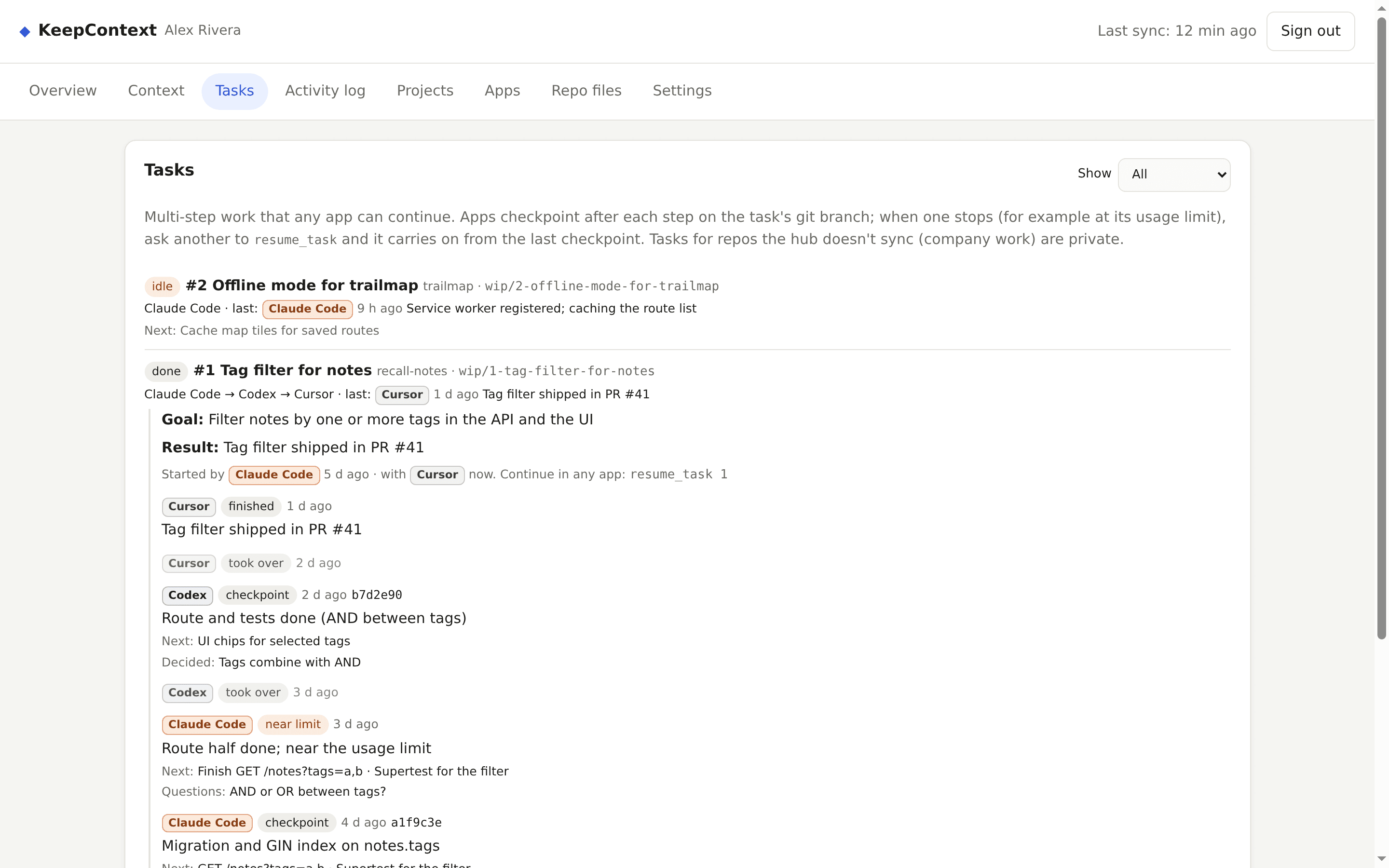
Every AI app keeps its own memory, so an idea you tell ChatGPT is unknown to Cursor, and work started in Claude Code is stuck there when it hits a usage limit. KeepContext is one small server that all of them connect to over the Model Context Protocol (MCP). Apps load your context at the start of a conversation and save new ideas and decisions back. For multi-step coding work, an app starts a task and saves a short checkpoint after each step on the task's git branch; another app can then resume it with the goal, the next steps and the history, and the first app can later review what the others did. It began as my personal hub, which I use every day across nine apps, and I released a cleaned-up version as open source.
Problem
I use ChatGPT, Claude, Gemini, Cursor, Codex and Copilot, and each one forgets what the others know. I kept re-explaining my projects and decisions, and when an app hit its usage limit in the middle of a task, the plan and the progress were stuck inside it until the limit reset.
Approach
Put the memory outside the apps: one server I own, which every app reaches through MCP. Make it trustworthy before making it clever: each app gets its own token so changes are attributed to the real app, private data never reaches apps connected by a plain URL, and coding work is saved as small checkpoints plus git commits, because an app that has hit its limit can't save anything at that moment.
Architecture
One Node.js process with Express and SQLite (node:sqlite), and a stateless MCP endpoint built with the official SDK and Zod schemas. Business logic lives in one module, so the web UI, the REST API and the MCP tools behave the same. A vanilla JavaScript dashboard, no build step. Shipped as a non-root Docker image for amd64 and arm64; my own instance runs on a Google Cloud VM behind Tailscale Funnel, with GitHub Actions deploying it over Tailscale SSH and rolling back if the health check fails.
Key interactions
- Used daily across nine apps on my own instance before it was released
- Connection tokens stored only as SHA-256 hashes; rotate or revoke one app without touching the others
- Verified attribution: the dashboard shows the app from its token, even when a model reports something else
- Task handoffs: goal, next steps, branch and history for the next app, plus a git diff since your own last checkpoint
- Rate limits on failed logins, wrong tokens and requests per app; first-run setup protected by a one-time code
- End-to-end tests against a fake GitHub and a fake Google, CI on three Node versions, CodeQL and Dependabot
Technical decisions
Attribution from the token, not from the model
Models often report the wrong app name. Giving each app and account its own token means the hub knows who wrote something without asking, and a leaked token can be revoked for one app only.
Checkpoint after every step
An app that has hit its usage limit can't save its state, so handoffs can't rely on a final save. Apps write a short checkpoint after each step and commit work in progress to the task's branch; the next app starts from the last one.
Private data never goes over a URL
Web apps like ChatGPT connect with a secret URL, which is easy to leak. Private entries and tasks for unsynced (work) repos are only served over the Authorization header to apps allowed to see them, never over the URL.
A fresh public repository
My personal hub's history contains my server address and personal notes, so the open-source version started from a clean copy with fictional test data, instead of rewriting history.
What I took from it
- The hard part of shared AI memory is trust: knowing which app wrote what, and what each app is allowed to see.
- Making setup easy for strangers (a setup page, one Docker command, a tunnel option) took as much work as the core features.